Receipt Parsing API
Extract JSON data from receipt images and PDFs using your schema.
Try It Live
Extract structured JSON from the preloaded sample, then switch to your own document when you are ready.
Document
sample-receipt.jpg
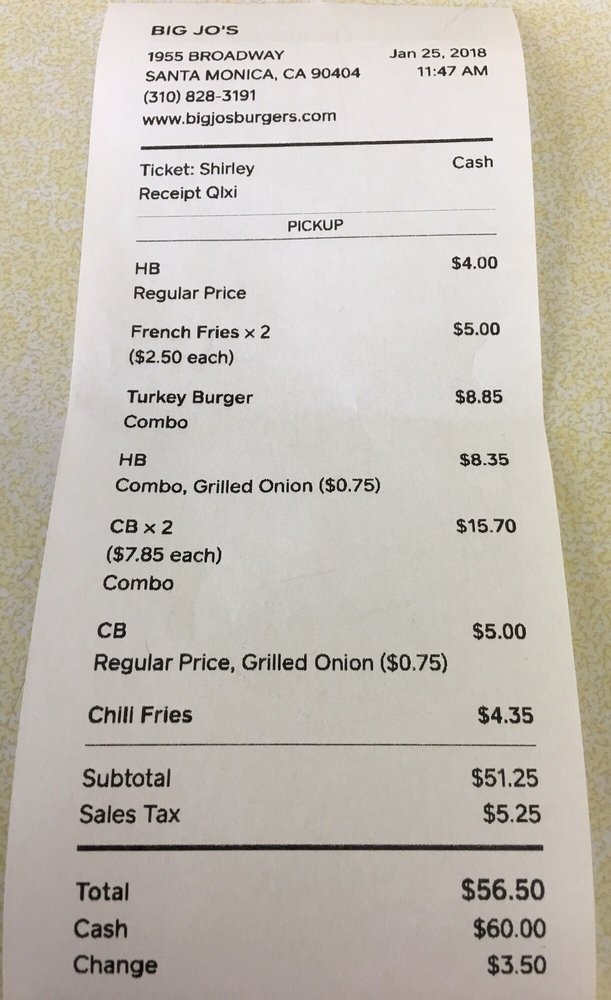
Add fields, nested object fields, and lists of objects to build your schema.
List Item Fields
Generated JSON schema output from your form configuration.
{
  "type": "object",
  "properties": {
    "restaurant_name": {
      "type": "string"
    },
    "order_type": {
      "type": "string",
      "description": "Pickup or dine in"
    },
    "items": {
      "type": "array",
      "items": {
        "type": "object",
        "properties": {
          "name": {
            "type": "string"
          },
          "quantity": {
            "type": "number"
          },
          "price_per_item": {
            "type": "number",
            "description": "Price per each item, for example \"$5.00 each\""
          },
          "additional_charge": {
            "type": "number",
            "description": "Added in ()"
          },
          "total_per_item": {
            "type": "number"
          }
        },
        "required": [
          "name",
          "quantity",
          "price_per_item",
          "additional_charge",
          "total_per_item"
        ]
      }
    },
    "subtotal": {
      "type": "number"
    },
    "sales_tax": {
      "type": "number"
    },
    "total": {
      "type": "number"
    },
    "cash": {
      "type": "number"
    },
    "change": {
      "type": "number"
    }
  },
  "required": [
    "restaurant_name",
    "order_type",
    "items",
    "subtotal",
    "sales_tax",
    "total",
    "cash",
    "change"
  ]
}
Configure a schema and click Extract to see results.
Ready to try it on your own document?
We will save your file and schema so you can pick up where you left off after sign-in.
Use via API
Drop the same schema into your stack. Pick a language tab to copy a request that uses the sample document and starter schema.
Receipt Parsing API in TypeScript
Type-safe TypeScript example using fetch and a JSON schema. Drop into Next.js, Express, or any Node runtime.
import { readFileSync } from 'node:fs';

const schema = {
  "type": "object",
  "properties": {
    "restaurant_name": {
      "type": "string"
    },
    "order_type": {
      "type": "string",
      "description": "Pickup or dine in"
    },
    "items": {
      "type": "array",
      "items": {
        "type": "object",
        "properties": {
          "name": {
            "type": "string"
          },
          "quantity": {
            "type": "number"
          },
          "price_per_item": {
            "type": "number",
            "description": "Price per each item, for example \"$5.00 each\""
          },
          "additional_charge": {
            "type": "number",
            "description": "Added in ()"
          },
          "total_per_item": {
            "type": "number"
          }
        },
        "required": [
          "name",
          "quantity",
          "price_per_item",
          "additional_charge",
          "total_per_item"
        ]
      }
    },
    "subtotal": {
      "type": "number"
    },
    "sales_tax": {
      "type": "number"
    },
    "total": {
      "type": "number"
    },
    "cash": {
      "type": "number"
    },
    "change": {
      "type": "number"
    }
  },
  "required": [
    "restaurant_name",
    "order_type",
    "items",
    "subtotal",
    "sales_tax",
    "total",
    "cash",
    "change"
  ]
};

const file = new File([readFileSync('sample-receipt.jpg')], 'sample-receipt.jpg', {
  type: 'image/jpeg',
});

const formData = new FormData();
formData.set('file', file);
formData.set('schema', JSON.stringify(schema));

const response = await fetch('https://api.structpdf.com/v1/extract', {
  method: 'POST',
  headers: {
    Authorization: `Bearer ${process.env.STRUCTPDF_API_KEY}`,
  },
  body: formData,
});

const data = await response.json();
console.log(data);
Receipt Parsing API in JavaScript
Plain JavaScript / Node.js example using fetch. Works in Node 18+ and modern serverless runtimes.
const fs = require('node:fs');

const schema = {
  "type": "object",
  "properties": {
    "restaurant_name": {
      "type": "string"
    },
    "order_type": {
      "type": "string",
      "description": "Pickup or dine in"
    },
    "items": {
      "type": "array",
      "items": {
        "type": "object",
        "properties": {
          "name": {
            "type": "string"
          },
          "quantity": {
            "type": "number"
          },
          "price_per_item": {
            "type": "number",
            "description": "Price per each item, for example \"$5.00 each\""
          },
          "additional_charge": {
            "type": "number",
            "description": "Added in ()"
          },
          "total_per_item": {
            "type": "number"
          }
        },
        "required": [
          "name",
          "quantity",
          "price_per_item",
          "additional_charge",
          "total_per_item"
        ]
      }
    },
    "subtotal": {
      "type": "number"
    },
    "sales_tax": {
      "type": "number"
    },
    "total": {
      "type": "number"
    },
    "cash": {
      "type": "number"
    },
    "change": {
      "type": "number"
    }
  },
  "required": [
    "restaurant_name",
    "order_type",
    "items",
    "subtotal",
    "sales_tax",
    "total",
    "cash",
    "change"
  ]
};

const file = new File([fs.readFileSync('sample-receipt.jpg')], 'sample-receipt.jpg', {
  type: 'image/jpeg',
});

const formData = new FormData();
formData.set('file', file);
formData.set('schema', JSON.stringify(schema));

const response = await fetch('https://api.structpdf.com/v1/extract', {
  method: 'POST',
  headers: {
    Authorization: `Bearer ${process.env.STRUCTPDF_API_KEY}`,
  },
  body: formData,
});

const data = await response.json();
console.log(data);
Receipt Parsing API in Python
Python example using requests. Works on Python 3.8+ and integrates cleanly with Django, FastAPI, and ETL pipelines.
import json
import os
import requests

schema = {
  "type": "object",
  "properties": {
    "restaurant_name": {
      "type": "string"
    },
    "order_type": {
      "type": "string",
      "description": "Pickup or dine in"
    },
    "items": {
      "type": "array",
      "items": {
        "type": "object",
        "properties": {
          "name": {
            "type": "string"
          },
          "quantity": {
            "type": "number"
          },
          "price_per_item": {
            "type": "number",
            "description": "Price per each item, for example \"$5.00 each\""
          },
          "additional_charge": {
            "type": "number",
            "description": "Added in ()"
          },
          "total_per_item": {
            "type": "number"
          }
        },
        "required": [
          "name",
          "quantity",
          "price_per_item",
          "additional_charge",
          "total_per_item"
        ]
      }
    },
    "subtotal": {
      "type": "number"
    },
    "sales_tax": {
      "type": "number"
    },
    "total": {
      "type": "number"
    },
    "cash": {
      "type": "number"
    },
    "change": {
      "type": "number"
    }
  },
  "required": [
    "restaurant_name",
    "order_type",
    "items",
    "subtotal",
    "sales_tax",
    "total",
    "cash",
    "change"
  ]
}

with open("sample-receipt.jpg", "rb") as fh:
    response = requests.post(
        "https://api.structpdf.com/v1/extract",
        headers={"Authorization": f"Bearer {os.environ['STRUCTPDF_API_KEY']}"},
        files={"file": ("sample-receipt.jpg", fh, "image/jpeg")},
        data={"schema": json.dumps(schema)},
    )

response.raise_for_status()
print(response.json())
Receipt Parsing API in Java
Java example using HttpClient. Works on Java 11+ and integrates with Spring Boot or any JVM service.
import java.net.URI;
import java.net.http.HttpClient;
import java.net.http.HttpRequest;
import java.net.http.HttpResponse;
import java.nio.file.Files;
import java.nio.file.Path;
import java.util.UUID;

public class ExtractExample {
  public static void main(String[] args) throws Exception {
    String schema = "{\"type\":\"object\",\"properties\":{\"restaurant_name\":{\"type\":\"string\"},\"order_type\":{\"type\":\"string\",\"description\":\"Pickup or dine in\"},\"items\":{\"type\":\"array\",\"items\":{\"type\":\"object\",\"properties\":{\"name\":{\"type\":\"string\"},\"quantity\":{\"type\":\"number\"},\"price_per_item\":{\"type\":\"number\",\"description\":\"Price per each item, for example \\"$5.00 each\\"\"},\"additional_charge\":{\"type\":\"number\",\"description\":\"Added in ()\"},\"total_per_item\":{\"type\":\"number\"}},\"required\":[\"name\",\"quantity\",\"price_per_item\",\"additional_charge\",\"total_per_item\"]}},\"subtotal\":{\"type\":\"number\"},\"sales_tax\":{\"type\":\"number\"},\"total\":{\"type\":\"number\"},\"cash\":{\"type\":\"number\"},\"change\":{\"type\":\"number\"}},\"required\":[\"restaurant_name\",\"order_type\",\"items\",\"subtotal\",\"sales_tax\",\"total\",\"cash\",\"change\"]}";
    Path file = Path.of("sample-receipt.jpg");
    String boundary = UUID.randomUUID().toString();
    String CRLF = "\r\n";

    var body = new java.io.ByteArrayOutputStream();
    body.writeBytes(("--" + boundary + CRLF
        + "Content-Disposition: form-data; name=\"schema\"" + CRLF + CRLF
        + schema + CRLF).getBytes());
    body.writeBytes(("--" + boundary + CRLF
        + "Content-Disposition: form-data; name=\"file\"; filename=\"sample-receipt.jpg\"" + CRLF
        + "Content-Type: image/jpeg" + CRLF + CRLF).getBytes());
    body.writeBytes(Files.readAllBytes(file));
    body.writeBytes((CRLF + "--" + boundary + "--" + CRLF).getBytes());

    HttpRequest request = HttpRequest.newBuilder()
        .uri(URI.create("https://api.structpdf.com/v1/extract"))
        .header("Authorization", "Bearer " + System.getenv("STRUCTPDF_API_KEY"))
        .header("Content-Type", "multipart/form-data; boundary=" + boundary)
        .POST(HttpRequest.BodyPublishers.ofByteArray(body.toByteArray()))
        .build();

    HttpResponse<String> response = HttpClient.newHttpClient()
        .send(request, HttpResponse.BodyHandlers.ofString());
    System.out.println(response.body());
  }
}
Receipt Parsing API in Go
Go example using net/http. Idiomatic Go HTTP client suitable for microservices and serverless functions.
package main

import (
	"bytes"
	"fmt"
	"io"
	"mime/multipart"
	"net/http"
	"net/textproto"
	"os"
)

func main() {
	schema := `{"type":"object","properties":{"restaurant_name":{"type":"string"},"order_type":{"type":"string","description":"Pickup or dine in"},"items":{"type":"array","items":{"type":"object","properties":{"name":{"type":"string"},"quantity":{"type":"number"},"price_per_item":{"type":"number","description":"Price per each item, for example \"$5.00 each\""},"additional_charge":{"type":"number","description":"Added in ()"},"total_per_item":{"type":"number"}},"required":["name","quantity","price_per_item","additional_charge","total_per_item"]}},"subtotal":{"type":"number"},"sales_tax":{"type":"number"},"total":{"type":"number"},"cash":{"type":"number"},"change":{"type":"number"}},"required":["restaurant_name","order_type","items","subtotal","sales_tax","total","cash","change"]}`

	file, err := os.Open("sample-receipt.jpg")
	if err != nil {
		panic(err)
	}
	defer file.Close()

	var body bytes.Buffer
	writer := multipart.NewWriter(&body)
	_ = writer.WriteField("schema", schema)

	header := make(textproto.MIMEHeader)
	header.Set("Content-Disposition", "form-data; name=\"file\"; filename=\"sample-receipt.jpg\"")
	header.Set("Content-Type", "image/jpeg")
	part, err := writer.CreatePart(header)
	if err != nil {
		panic(err)
	}
	if _, err := io.Copy(part, file); err != nil {
		panic(err)
	}
	writer.Close()

	req, err := http.NewRequest("POST", "https://api.structpdf.com/v1/extract", &body)
	if err != nil {
		panic(err)
	}
	req.Header.Set("Authorization", "Bearer "+os.Getenv("STRUCTPDF_API_KEY"))
	req.Header.Set("Content-Type", writer.FormDataContentType())

	resp, err := http.DefaultClient.Do(req)
	if err != nil {
		panic(err)
	}
	defer resp.Body.Close()

	out, _ := io.ReadAll(resp.Body)
	fmt.Println(string(out))
}
Frequently Asked Questions
What does the Receipt Parsing API return?
Send a receipt PDF or image plus a JSON schema and get back structured JSON shaped exactly like your schema, alongside per-field findings, snippets, and page references that explain where each value came from.
Which file formats are supported?
PDFs and common image formats all flow through the same extraction endpoint, so scans, mobile photos, and digital receipts can be ingested in one call.
| Format | Typical source |
|---|---|
| Digital receipts, vendor exports | |
| PNG | Screenshots, exported images |
| JPG / JPEG | Scanned receipts, photos |
| HEIC | iPhone camera uploads |
How is usage priced?
Extractions are billed per page in credits. There is no separate parse charge before extraction — the credit you see is the credit you pay.
| Extraction | Credit usage |
|---|---|
| Simple | 1 credit per page |
| Complex | 2 credits per page |
Is there a free tier?
Yes. Sign up for a free account and run extractions on the included monthly credits with no credit card required. Upgrade to Pay-As-You-Go or a subscription only when your volume grows.
Can I customize the fields I extract?
Yes. Edit the schema in the playground or build it visually in the Schema Builder. Save it once and reuse it in production via schema_id, including nested objects and line-item arrays such as items[].
How accurate is extraction on messy receipts?
The API is tuned for multi-vendor invoices, varied layouts, and noisy scans. Every response also includes metadata.findings and field-level metadata.errors so you can route edge cases to manual review without losing the fields that extracted cleanly.
Do I have to sign up to try it?
No. Run the demo on a sample receipt without an account. When you upload your own receipt, we ask you to sign in with Google or a magic link to run your first extraction. Your file and schema are saved automatically so you pick up where you left off.
Pricing
Start on the free plan, then continue with Pay-As-You-Go or a subscription as your volume grows.
- 250 credits/month
- No credit card required
- Schema builder (save requires upgrade)
- Up to 1,000 extractions
- $0.019 per credit
- 1,000 credits
- Save and reuse extraction schemas
- Up to 2,500 extractions
- $0.0156 per credit
- 2,500 credits
- Save and reuse extraction schemas
- Up to 8,000 extractions
- $0.0124 per credit
- 8,000 credits
- Save and reuse extraction schemas